Understanding Computer Vision Syndrome
Computer Vision Syndrome (CVS), also known as Digital Eye Strain, is a group of eye and vision-related problems resulting from prolonged computer, tablet, and smartphone use. If you are experiencing blurred vision, debilitating headaches, or “gritty” dry eyes, these symptoms are often caused by decreased blink rates and binocular misalignment during screen time.
Key Takeaways: Protecting Your Vision in the Digital Age
These are the most critical, actionable steps to prevent and treat Computer Vision Syndrome (CVS):
-
Implement the 20/20/20 Rule: To prevent fatigue, actively rest your eyes every 20 minutes by focusing on an object 20 feet away for at least 20 seconds.
-
Optimise Your Setup: Position your monitor 20–28 inches away, slightly below eye level, and use a stand to bring any printed reference materials to the same height.
-
Eliminate Glare: Reduce eye strain by adjusting natural light with blinds, installing dimmer switches for overhead lighting, or applying a physical anti-glare filter to your screen.
-
Confirm Your Vision Accuracy: Schedule regular check-ups to ensure your lens prescription is current, as uncorrected vision significantly accelerates CVS symptoms.
-
Customise Screen Settings: Reduce the strain caused by digital light and contrast by adjusting your brightness, contrast, and font size to a comfortable level.
Just a few decades ago, computer vision syndrome (CVS) was not known or understood. However, with an increase in the role of computers in our lives, it has become an increasingly common issue. Researchers believe that 50-90% of people who use computers in their daily lives have experienced CVS to some degree. The amount of time that many people stare into a computer screen is increasing, which puts significant strain on our eyes.
CVS is not considered a single specific problem, but a suite of issues. And with the increased use of school computers, tablets, and smartphones, children are also becoming more susceptible to CVS.
This syndrome is similar to many other repetitive motion type conditions, such as carpal tunnel syndrome. Problems can start because, as we are reading text on a screen, our eyes move in a repetitive motion throughout the day. Once the issue has started, continuing the same behaviour can worsen any symptoms. While reading alone uses the same motion, digital screens add flicker, contrast, glare, and light that all put additional strain on our eyes.
Issues may also be accelerated if you are wearing some type of corrective lens, but don’t, and are therefore putting additional strain on your eyes.
Ageing can also speed up the progress of these issues. Around the time that people turn 40, the lenses of the eyes begin to harden due to a disease called presbyopia, which affects their ability to see closer objects.
What happens if I have CVS?
There is currently no proof that CVS causes long-term vision impairment or blindness. Continuing to use a computer or any other type of screen can continue to be an annoyance or reduce your ability to see properly. Some of the warning signs of CVS are:
- Blurred vision
- Double vision
- Red or dry eyes
- Headaches
- Neck pain
- Back pain
- Eye Irritation
If you don’t properly treat CVS when these symptoms occur, you may begin to notice that you suffer from a decrease in overall quality of life or job performance.
The Sahara Desert Effect: Why Screens Cause Chronic Dry Eye
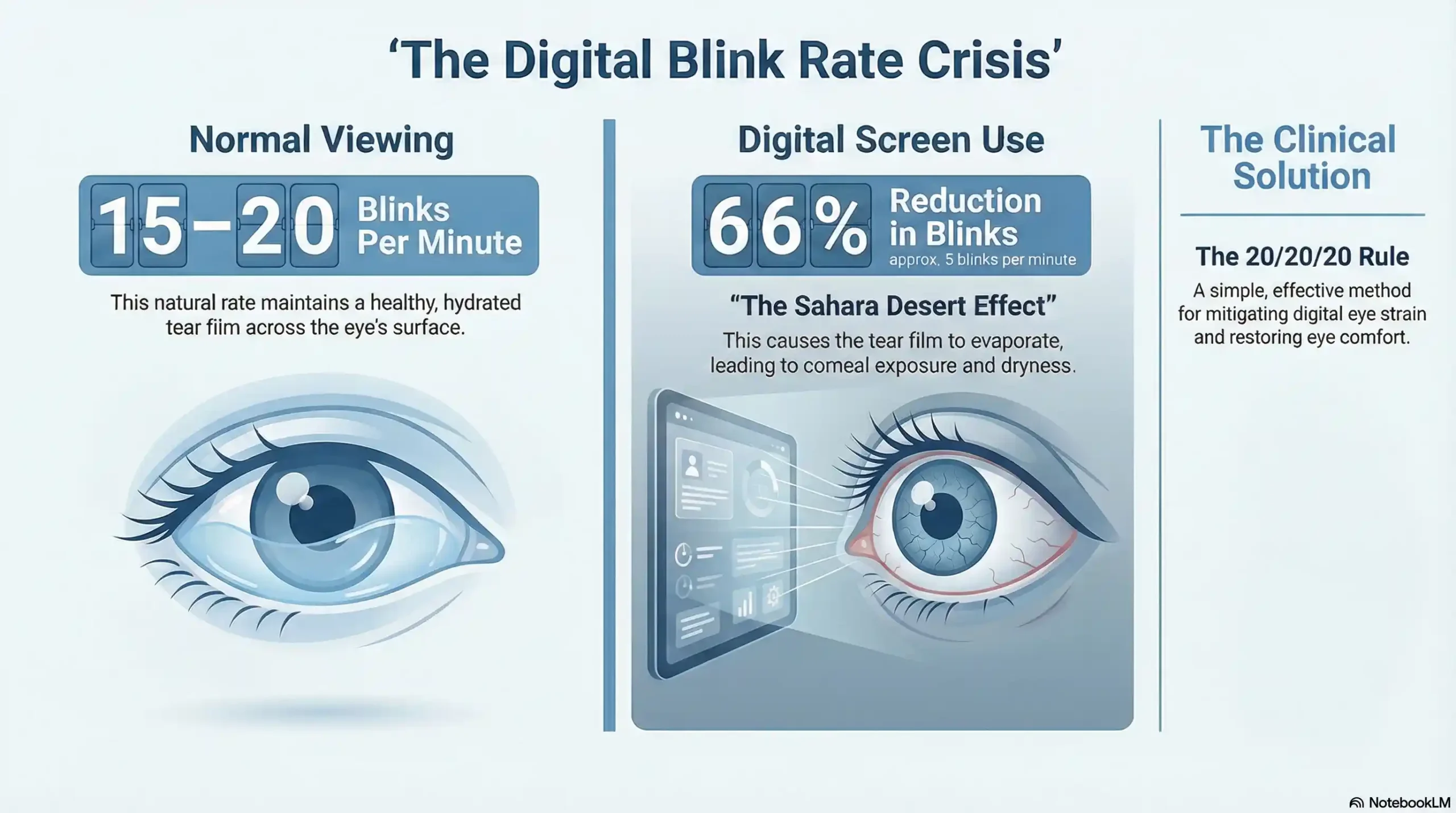
Have you ever noticed that you stop blinking when you’re deep in a “flow state” at work? It’s a biological glitch: humans typically blink 15–20 times per minute, but studies show our blink rate drops by a staggering 66% when staring at digital devices.
This “blink crisis” leads to what we call the Sahara Desert Effect. Without regular blinking, your tear film evaporates, leaving your eyes exposed, red, and gritty.
-
The Hidden Danger: Chronic dryness isn’t just an annoyance; it can cause microscopic scratches on your cornea.
-
Dr. Zaver’s Straight Talk: “If over-the-counter drops aren’t providing lasting relief, you may have Meibomian Gland Dysfunction (MGD). We use advanced diagnostics to determine if your tears are lacking the essential oils needed to stay on the eye.”
Take Action: If your eyes feel like sandpaper, explore our targeted Dry Eye Treatments in Richmond to find long-term relief.
Digital Classrooms: Protecting Your Child’s Developing Vision
Today’s kids aren’t just using screens for fun; they are learning on them for hours. Because a child’s visual system is still developing, digital eye strain can manifest as more than just tired eyes—it can actually change the shape of their eye.
Signs your child may be struggling:
-
Avoidance: Quitting homework early because their eyes “hurt.”
-
Physical Cues: Frequent eye rubbing or tilting the head to see the screen clearly.
-
The Myopia Link: Excessive “near-work” (like tablets) is a major driver in the rise of nearsightedness.
Parent Tip: Don’t wait for a school screening to fail. Schedule a specialized Pediatric Eye Exam to ensure their eyes are developing correctly, and learn about our Myopia Management options.
The Blue Light Debate: Protecting Your Sleep and Your Sight
There is plenty of marketing “noise” about blue light glasses. Here is the clinical reality: Digital screens emit high-energy visible (HEV) blue light. While blue light isn’t the primary cause of CVS pain, it is a major disruptor of your Circadian Rhythm.
Exposure to blue light late in the evening suppresses melatonin, making it harder to fall asleep. A tired brain leads to tired eyes the next morning, creating a cycle of exhaustion.
-
What Works: Use “Night Shift” modes on devices, but for true protection, consider medical-grade lens coatings that filter HEV light without distorting your color perception.
Browse Eyewear: Looking for the perfect pair of “work glasses”? Check out the Frames We Carry and ask about our specialized blue-light-filtering coatings.
Why a Standard Eye Exam Might Miss Your CVS Symptoms
You might have “20/20 vision” but still suffer from debilitating headaches and neck pain. This happens because a standard eye exam checks how each eye sees individually, but it often misses how they align as a pair.
When your eyes are even slightly misaligned, your brain and eye muscles have to work overtime to “force” them to work together. This constant struggle—called Trigeminal Dysphoria—is a leading cause of digital headaches.
The Frame & Focus Difference: We utilize state-of-the-art technology to measure eye misalignment down to the fraction of a millimeter. For many, the answer is Neurolens—the first contoured prism lens designed to fix misalignment and stop the “tug-of-war” in your vision.
End the Headaches: Find out if you are a candidate for this life-changing technology by visiting our Neurolens page or booking a Comprehensive Eye Exam.
[Take the 2-Minute Headache & Eye Misalignment Quiz]
Treatment Options
Fortunately, CVS can usually be treated with just a few small changes to your viewing habits or to the settings of your screen itself.
Reduce Glare
It’s essential to reduce the amount of glare that comes off your computer screen, as the glare adds additional strain to your eyes. You can reduce the glare by changing the angle of your computer screen so that it doesn’t reflect light into your eye. You could also install a dimmer switch and reduce the brightness of the overhead lighting. If you have natural light that enters your office, you can try moving your monitor to a different location and then adjust the settings of your blinds to reduce or block the light coming in. Or you can purchase a glare filter that goes over the top of your screen.
Move Your Desk
Your ideal monitor position is just below your eye level and approximately 20-28 inches in front of your eyes. You shouldn’t have to change your head position or strain your neck to read what is on your screen. If you work with printed materials, put a stand next to your monitor to keep everything at the same height.
Change Your Settings
Simply changing the settings of your screen can result in a significant reduction in your eye strain. You can adjust the brightness, contrast, and even change the font size to make things easier for you to see.
Take Breaks
Your breaks don’t have to take up much time. Doctors recommend using the 20/20/20 rule. This rule simply states that every 20 minutes, you should look at an object 20 feet away for 20 seconds. Additionally, if you feel that your eyes are straining, it’s a good idea to get away from your screen for a few minutes.
Update Your Prescription
Reducing the amount of work your eyes must do to see is always a good idea. Making sure that your prescription is accurate for you helps to reduce that strain. There are also options now to include an anti-glare coating on the lenses of your glasses that helps to reduce the glare that passes through the lens to your eye. You can also use sunglasses that have polarised lenses to help protect your eyes.
Further Reading & Citations
For more in-depth information on Computer Vision Syndrome and its management, please refer to the following resources:
-
American Academy of Ophthalmology (AAO): Provides detailed, medically reviewed information on the causes, symptoms, and clinical treatments for digital eye strain.
-
Resource: AAO on Computer Eye Strain
-
-
National Institute of Occupational Safety and Health (NIOSH): Offers guidelines and ergonomic recommendations for computer workstations to reduce the risk of work-related vision problems like CVS.
-
Resource: NIOSH Guide to Computer Workstations
-
Don’t Let Digital Strain Ruin Your Focus
At Frame & Focus Eye Care, we know that vision issues aren’t just an inconvenience—they are “out here trying to ruin our lives!” Whether you are a parent worried about your child’s screen time or a professional battling daily headaches, you don’t have to settle for “tired eyes.”
Experience the Frame & Focus Difference:
-
Expert Clinical Care: Dr. Sarah Zaver uses state-of-the-art technology to see what standard exams miss.
-
Human Touch: We treat you like family, not a chart number.
-
Real Solutions: From Neurolens to advanced Dry Eye therapy, we tackle the root cause of your discomfort.
Ready to see clearly again?
Schedule Your Comprehensive Eye Exam Online or call us today at: (832) 930-7797
FAQs
-
CVS is caused by extended screen use, where the eyes must constantly manage flicker, contrast, glare, and light, leading to repetitive motion strain.